


Say you work on your website on whatever language that may be, for this example, I’ll use ASP.
Then you encounter an error message, for this example, say the dreaded500 – Internal server error (picture 1).

Â
 So you sit there thinking “Ok, thanks! That doesn’t give me a clue on what my problem is!“
 Lets fix that, shell we?
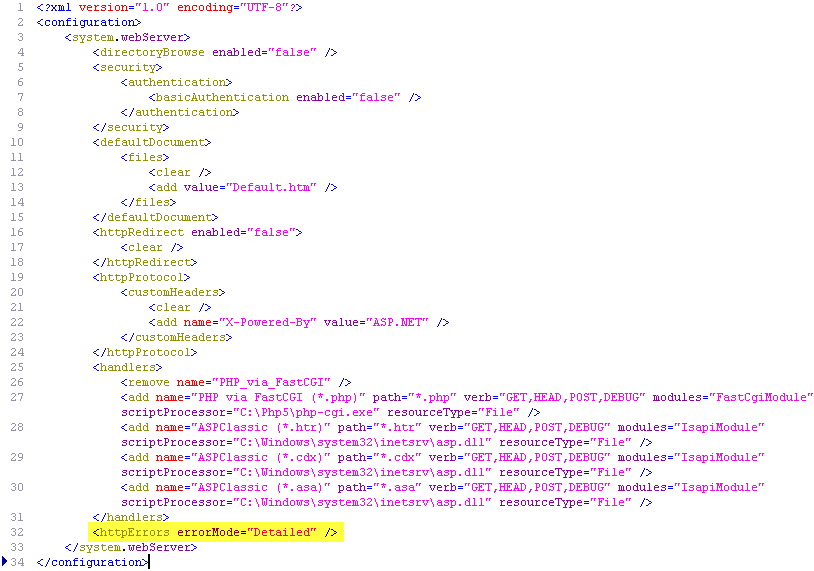
Edit your web.config file, inside the <system.webServer>section put this line in:
<httpErrors errorMode=â€Detailed†/>
See (picture 2) for an example.
Â
Â
IMPORTANT: If you are using ASP .NET, you also need to add the following inside the <system.web> tags of your web.config (at the end of the tag). If there is no <system.web>, simply create a starting and ending tag before <system.webserver> like so:<system.web><customErrors defaultRedirect=â€errors.aspx†mode=â€Off†/></system.web>Â
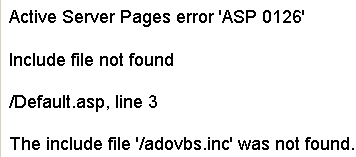
Ok! Now I know that I forgot my include file … how silly of me!
FYI, that code was bound to break on purpose, since I didn’t really have those includes… this code was just for the purpose of this demonstration and is noted for you, below:
<%@ Language=VBScript %>
<% Option Explicit %>
<!– #include virtual = “/adovbs.inc†–>
<!– #include virtual = “/conn.asp†–><!doctype html public “-//w3c//dtd html 3.2//enâ€>
<html>
<head>
<title>(Type a title for your page here)</title>
</head><body bgcolor=â€#ffffff†text=â€#000000″ link=â€#0000ff†vlink=â€#800080″ alink=â€#ff0000″>
<%
Dim conn,R,SQL,RecsAffectedSet conn=Server.CreateObject(“ADODB.Connectionâ€)
conn.Mode=adModeReadWrite
conn.ConnectionString = aConnectionString
conn.Open